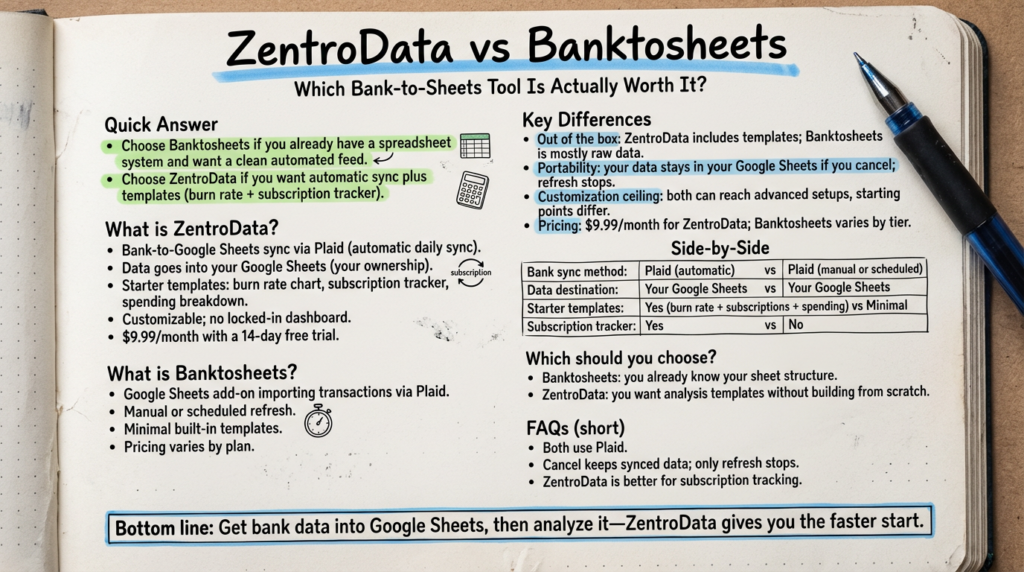
ZentroData and Banktosheets both solve the same core problem: getting your bank transaction data into Google Sheets automatically. If you’ve spent time manually exporting CSVs, cleaning up messy data, and rebuilding your spreadsheet every month, either tool will feel like a meaningful upgrade. The real difference is what happens after the data lands. Banktosheets focuses on raw data import, giving you a structured feed of transactions to work with. ZentroData includes that same automatic sync plus pre-built analysis templates, a burn rate chart, and a subscription tracker you can modify or replace. When done right, bank-to-sheets automation eliminates the manual work and gives you financial data you can actually analyze. When done poorly, you still have raw transaction data you have to organize yourself. This article breaks down the key differences so you can make the right call.
Table of Contents
Quick Answer
Choose Banktosheets if you already have a spreadsheet system built, you know exactly how you want the data structured, and you just need a clean automated feed with no extras.
Choose ZentroData if you want automatic bank sync plus ready-to-use analysis templates, including a burn rate chart and subscription tracker, and you want your data inside Google Sheets you own and control from day one.
What Is ZentroData?
ZentroData is a bank-to-Google Sheets sync service that automatically pulls your transaction data from connected bank accounts and deposits it into your own Google Sheets. It includes starter templates for burn rate tracking, subscription monitoring, and spending breakdown analysis. You can use those templates as-is, customize them completely, or replace them with your own formulas and charts.
The core idea: your data, your spreadsheet, your analysis. ZentroData handles the connection and the sync. You decide what to do with the data.
Key details:
- Automatic daily bank sync via Plaid
- Data goes into your Google Sheets, not a proprietary dashboard
- Starter templates included: burn rate chart, subscription tracker, spending breakdown
- Fully customizable with no locked-in views or categories
- $9.99/month with a 14-day free trial
What Is Banktosheets?
Banktosheets is a Google Sheets add-on that pulls bank transaction data into a spreadsheet using a Plaid connection. It imports raw transaction data and account balances on demand or on a set schedule. The focus is on getting the data in. What you do with it after that is up to you.
Key details:
- Google Sheets add-on format
- Transaction data import via Plaid
- Manual or scheduled refresh options
- Minimal built-in templates
- Pricing varies by plan
Key Differences
What You Get Out of the Box
This is where the two tools split most visibly.
Banktosheets delivers your transaction data into a sheet. The data is structured and usable, but the organization, analysis, and visualization are on you. If you already know exactly how you want to build your financial tracking system, that is a reasonable starting point. If you are figuring it out as you go, you are starting from scratch.
ZentroData delivers the same transaction data plus starter templates you can use on day one. The burn rate chart shows you what you are spending each month against your income. The subscription tracker pulls recurring charges and surfaces ones you might have forgotten about. The spending breakdown gives you a category view you can reorganize to match how you actually think about money.
None of these are locked in. You can modify them, delete them, or ignore them entirely and build your own. But they exist, which matters when you want to understand your finances this week, not after you have spent a weekend building infrastructure.
Data Ownership and Portability
Both tools send data to Google Sheets you own. That matters. You are not locked into a proprietary dashboard, a closed app, or a CSV export workflow. Your data lives in your Google Drive.
The difference is what surrounds the data. With Banktosheets, the add-on manages the sync, but if you cancel, you keep whatever data is already in the sheet and lose the refresh. With ZentroData, the same principle applies, and you keep the templates and any customization you have built on top.
Neither tool holds your data hostage. That is a baseline requirement for any tool in this category, and both meet it.
Customization Ceiling
If you are a developer or a serious spreadsheet user, you will eventually want to build something specific: a net worth tracker, a tax prep sheet, a dashboard that tracks your savings rate month over month. Both tools get you there because both put raw data into Google Sheets.
The question is what your starting point looks like. Banktosheets starts you at a raw transaction feed. ZentroData starts you at a functional analysis layer you can tear down or build on top of. The ceiling is the same. The floor is different.
Pricing
ZentroData is $9.99/month with a 14-day free trial. Banktosheets pricing varies by tier depending on the number of accounts connected and refresh frequency.
For most people tracking two to three bank and credit card accounts with daily syncing, the pricing is comparable. The difference comes down to what is included at that price: ZentroData’s templates and starter analysis layer represent meaningful time saved that Banktosheets leaves entirely to the user.
Side-by-Side Comparison
| Feature | ZentroData | Banktosheets |
|---|---|---|
| Bank sync method | Plaid (automatic) | Plaid (manual or scheduled) |
| Data destination | Your Google Sheets | Your Google Sheets |
| Starter templates | Yes: burn rate, subscriptions, spending | Minimal |
| Customizable views | Fully | Fully |
| Subscription tracker | Yes | No |
| Burn rate chart | Yes | No |
| Pricing | $9.99/month | Varies by plan |
| Free trial | 14 days | Varies |
| Best for | Analysis + sync from day one | Raw data only |
Which Should You Choose?
Here is the thing: if you are comparing these two tools, you already know you want your bank data in Google Sheets. That part is not the question. The question is how much infrastructure you want to build yourself.
Banktosheets is a reasonable fit if you have a specific spreadsheet system already built and you need a clean automated feed to power it. You will spend no time learning templates and no time adapting someone else’s analysis framework.
ZentroData is the better fit for most people in this category because it removes two distinct friction points: getting the data in, and making the data usable. The starter templates are not there to hand-hold you. They are there because building a burn rate chart from scratch every time you switch tools is wasted energy. You can customize everything. But you do not have to start from nothing.
The real question is what your time is worth. If you are spending a weekend building a financial tracking system instead of using one, ask yourself whether that is because you genuinely need something custom or because you are avoiding the part where you have to look at the numbers.
Most people who start with ZentroData modify the templates within a week and never look back. Most people who start with raw data alone take longer to reach consistent analysis, if they get there at all.
FAQs
Q: Do both ZentroData and Banktosheets use Plaid? A: Yes, both tools use Plaid to connect to your bank accounts. Plaid is the standard bank connection layer used across most fintech products. Your bank credentials go to Plaid directly, not to either tool.
Q: Will my data stay in Google Sheets if I cancel? A: Yes. Whatever data has already synced to your Google Sheet stays there. You lose the automatic refresh when you cancel, but nothing already in the sheet is removed.
Q: Can I connect multiple bank accounts? A: Both tools support multiple accounts. ZentroData pulls all connected accounts into a unified view. The number of accounts you can connect may depend on which plan you are on with either tool.
Q: Do I need to know how to use Google Sheets to get started? A: Basic spreadsheet comfort is enough. You do not need to know formulas to use ZentroData’s starter templates. If you want to build custom analysis on top of your data, knowing Google Sheets helps, but it is not a requirement on day one.
Q: Is there a free trial? A: ZentroData offers a 14-day free trial. Banktosheets trial options vary by plan. Starting with ZentroData’s free trial is the lowest-risk way to see whether the tool fits your workflow before committing.
Q: Which tool is better for tracking subscriptions? A: ZentroData includes a built-in subscription tracker that flags recurring charges. Banktosheets does not include this by default. If subscription tracking is a priority, ZentroData has a clear advantage.
Q: Can I build custom charts with either tool? A: Yes. Since both tools put data into Google Sheets, you can build any chart Google Sheets supports. ZentroData gives you a starting point with pre-built charts. Banktosheets gives you the raw data to build from scratch.
The Bottom Line
If you want real visibility into your finances, getting your bank data into Google Sheets is the right move. Manual CSV exports do not work long-term. Proprietary apps with locked dashboards do not show you what you actually need to see. The tools in this category exist because the gap between “I have financial data somewhere” and “I can actually analyze my financial data” is wider than most people expect.
For people who want that analysis layer without spending a weekend building it, www.zentrodata.com pulls your real bank data directly into Google Sheets and gives you the templates to start making sense of it today. No locked dashboards, no generic charts, no manual exports. Your data, your spreadsheet, updated automatically.