A subscription scanner for your bank statement is a method of systematically reviewing recurring charges across all your accounts to identify, categorize, and evaluate every active subscription you’re paying for. It works by pulling transaction history, flagging charges that repeat on a consistent interval, and surfacing ones you forgot about or never intended to keep. The difference between doing this once and doing it on an ongoing basis is the difference between a one-time cleanup and actual financial visibility.
Most people underestimate how many subscriptions they’re carrying. Research suggests the average household pays for several subscriptions it no longer actively uses. That gap exists because recurring charges are designed to be invisible. They’re small, they’re automatic, and they don’t ask anything of you. The slow bleed continues until something forces you to look.
The cleanest way to run a real subscription scanner is to get all your bank data into Google Sheets and let the detection run continuously. That’s exactly what ZentroData does: it connects your bank accounts, syncs every transaction into a Google Sheet you own, and flags recurring charges automatically on every sync. Not a one-time scan. A permanent layer of visibility. If you want to skip ahead and see it working on your own data, start at zentrodata.com.
This guide covers how a subscription scan actually works, what separates a real audit from a surface-level review, and why the ongoing approach is the only one that keeps your recurring spend under control.
What a Subscription Scanner for Bank Statements Really Means
A subscription scanner is not a budgeting app feature that labels a transaction “subscription.” That’s a category, not a scan.
A real subscription scanner identifies recurring charges by pattern: same merchant, similar amount, consistent time interval. When all three signals align, you have a subscription, whether or not the tool you’re using has heard of the merchant. This matters because list-based detection only catches services it already knows. Pattern-based detection catches everything, including the gym membership you signed up for in January, the niche software tool from a free trial you forgot to cancel, and the annual charge from a service you thought you ended two years ago.
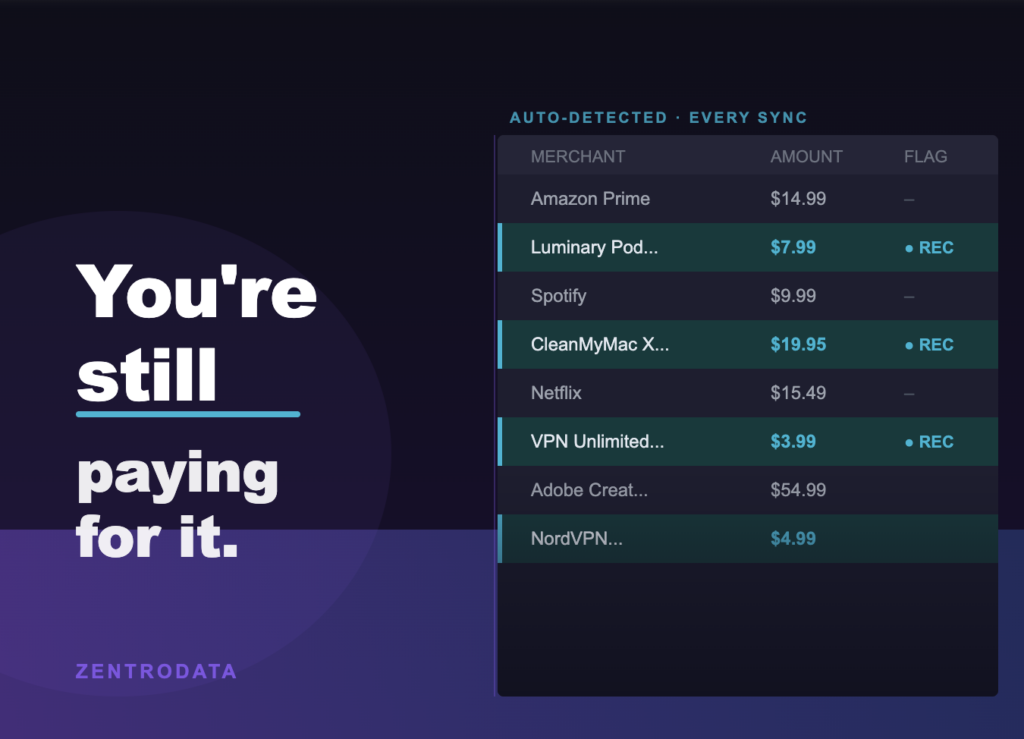
ZentroData uses both methods in combination. It runs a curated list of 80-plus known subscription services against your merchant and description fields, and separately runs a pattern detection engine that flags any merchant appearing at a similar amount on a roughly monthly interval. The two layers together catch what either one alone would miss. And because ZentroData syncs your transactions on a schedule you set, that detection isn’t a snapshot. It runs every time your data updates.
Why Running a Bank Statement Audit Matters
The math is simple. A $15 charge you don’t use costs $180 a year. Three of those is $540. Most people carrying dead subscriptions are carrying more than three.
What makes this harder to catch than it sounds is that subscriptions are distributed across accounts. Your streaming services hit your checking account. Your software subscriptions hit the credit card you use for work expenses. Your forgotten VPN hits a card you barely check. No single statement shows you the full picture, which is exactly why piecemeal reviews miss things.
This is also why a one-time audit has a shelf life of about 60 days. You clean it up today. By next quarter, you’ve signed up for two more things during free trials and forgotten to cancel one. The bleed starts again.
When your bank data lives in a Google Sheet that updates automatically, you don’t have to remember to look. ZentroData writes every new transaction into your sheet on schedule, flags new recurring charges as they appear, and keeps your subscription list current without you manually exporting anything. The audit doesn’t expire because it never stops running.
How to Find Hidden Subscriptions the Right Way
Pull Every Account Into One View
The first mistake people make is scanning one account. Subscriptions spread across every card and account you’ve ever used to sign up for something. A real bank statement audit covers all of them in a single pass.
With ZentroData, you connect multiple bank accounts once. Every institution syncs into the same Google Sheet, so your Chase checking, your Wells Fargo credit card, and your Bank of America savings all feed into one view. You stop looking at siloed statements and start seeing your actual recurring spend.
Manually, this means exporting CSVs from every account, cleaning the data, and combining it yourself. Most people do it once and don’t do it again. That’s not a process. That’s a project.
Let Pattern Detection Do the Heavy Lifting
Sorting through transactions by hand looking for repeats works, but it breaks down fast when you have hundreds of rows across multiple accounts. You’ll miss the $4.99 charge that appears under a slightly different merchant name each month. You’ll overlook the annual charge that only shows up once in your export window.
ZentroData’s subscription detection runs on every sync. It doesn’t require you to sort, filter, or remember to check. New recurring charges get flagged automatically, and the starter subscription tracker template gives you a working view of your recurring spend from day one. You can build on it, modify it, or replace it entirely with your own analysis. The data is in your Google Sheet. You own it.
Cancel Unused Subscriptions Immediately
Once you have a clean list of what you’re paying for, don’t defer the cancellations. Go through them while the list is in front of you. Most cancellations take two minutes on the service’s website. If a charge is unrecognizable, dispute it through your bank directly.
The standard to apply is simple: have you used it in the last 30 days? If not, and there’s no specific upcoming reason to keep it, cancel it now. “I might use it someday” has a dollar amount attached to it every month.
Keep the Detection Running
A subscription scanner that runs once is not a scanner. It’s a snapshot. The only version that actually changes your recurring spend over time is one that keeps watching.
ZentroData syncs on the schedule you configure, typically daily. Every new transaction is written to your sheet and evaluated against both detection methods. If a new recurring charge appears, it gets flagged. You see it in your spreadsheet the next time you open it, not the next time you remember to log into an app and check.
Cancel Unused Subscriptions: Common Approaches Compared
| Approach | Pros | Cons | Best For |
|---|---|---|---|
| Manual CSV export + spreadsheet | Full control, no third-party access | Time-consuming, breaks down across accounts, easy to abandon | One-time deep audits |
| Bank’s built-in subscription view | No setup required | Misses cross-account charges, list-based only | Quick single-account check |
| Budgeting app subscription view | Aggregates some accounts | Proprietary data, generic categories, detection gaps | Users who want a passive overview |
| ZentroData: automated bank sync to Google Sheets | All accounts in one place, dual-layer detection always running, fully customizable | Requires initial setup | Ongoing visibility in your own data |
The manual approach works once. ZentroData is the only approach that keeps working.
Tips for a Better Bank Statement Audit
- Cover all your accounts in a single pass. Cross-account visibility is the whole game, and it’s where manual methods consistently fall short.
- Go back at least 90 days to catch quarterly charges a single month of history would miss entirely.
- Don’t skip small amounts. A $3.99 charge you forgot about is $48 a year. Three of those is more than most people think they’re wasting.
- Search your email for “subscription”, “receipt”, and “renewal” to cross-check against your transaction data. You’ll find signups your bank statement didn’t surface.
- Treat any charge you don’t recognize as a red flag, not a curiosity. Investigate it before you move on.
- Annual subscriptions are the easiest to forget. Set a calendar reminder 30 days before renewal on anything you’re keeping but might want to reconsider.
- Once your transactions are in Google Sheets via ZentroData, you can build a month-over-month recurring spend chart in minutes. Watching that number move is a different kind of motivation than a static list.
Frequently Asked Questions About Subscription Scanners and Bank Statements
Q: How do I find hidden subscriptions on my bank statement? A: Look for recurring charges from the same merchant at similar amounts, spaced roughly 28 to 35 days apart. Review all accounts, not just one, and check at least 90 days of history. Tools like ZentroData automate this by syncing your bank data into Google Sheets and flagging recurring charges across all connected accounts on every sync.
Q: How often should I run a bank statement audit for subscriptions? A: Once a month is the practical minimum, but a manual monthly review is easy to skip. The more reliable approach is continuous detection: connecting your bank accounts to a tool that flags new recurring charges automatically as transactions come in, so the audit never goes stale between reviews.
Q: What is the best way to cancel unused subscriptions I find? A: Go directly to the service’s website and cancel through your account settings. If you can’t locate the option, search your email for the original signup receipt, which usually includes a cancellation link. For charges you don’t recognize, dispute them through your bank rather than attempting to contact the merchant.
Q: Can a subscription scanner catch annual charges, not just monthly ones? A: Yes, if the detection method includes pattern analysis rather than relying only on known merchant lists. ZentroData’s pattern detection flags merchants that recur at similar amounts on any consistent interval, including annual charges, as long as the transaction history window is long enough to catch the repeat.
Q: Why do most budgeting apps miss some of my subscriptions? A: Most apps match subscriptions against a fixed list of known merchant names. If a service isn’t on the list, or the merchant name in your transaction data doesn’t match exactly, the charge goes undetected. Pattern-based detection, which looks for recurring amounts and intervals regardless of merchant name, is what closes that gap.
The people who actually get their recurring spend under control are not the ones who do a big audit once a year. They’re the ones who can see their charges clearly, consistently, without relying on memory or manual exports to keep the picture current.
ZentroData connects your bank accounts and syncs every transaction into your own Google Sheets, with subscription detection that runs automatically on every sync. You get a starter subscription tracker template on day one, full control to build your own views, and an audit that never expires. Try it free for 14 days at zentrodata.com.